
However, unlocking that level of value comes at a cost. And unless you understand where those costs lie, it is easy to underestimate the scope and complexity of a Salesforce project.
Whether you are implementing Salesforce for the first time or scaling an existing setup, this blog walks through the key areas you need to consider. It is written primarily for senior leaders in sales, operations, and technology who want a clear, practical view of what it takes.
1. Licensing (What You Pay Every Year)
To keep this focused, I am concentrating on Sales Cloud, which is the starting point for most revenue teams.
Salesforce operates on a subscription model. Pricing mainly depends on the edition you choose and the number of users. See below the list prices for different regions:
It is important to note that not every user requires a full Sales Cloud license. You can also use Platform licenses, read-only or Community licenses, depending on the access needed. Getting this mix right can have a significant impact on cost efficiency.
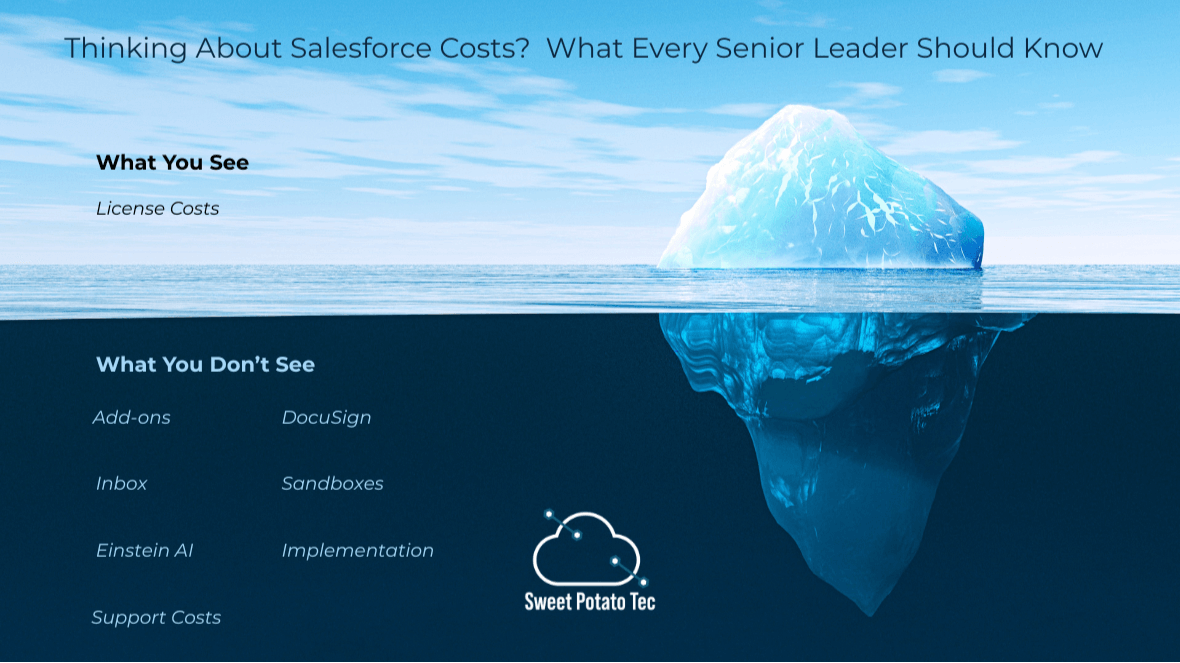
2. Add-Ons That Are Easy to Miss
Salesforce is built to be modular. That is a strength, but it also means that many useful features are not included in the base license. Some examples to look out for:
- E-signature integrations like DocuSign or Adobe Sign
- Salesforce Inbox for email and calendar connectivity
- Structured outbound tools like Sales Cadence or High Velocity Sales
- Einstein AI features, which are often priced separately
- Additional sandboxes for testing, training, or multi-phase delivery
If you are running a significant transformation, you will likely need a Full Copy Sandbox. The sandboxes can be expensive, but they are often essential for good-quality deliverables. The key is to avoid last-minute surprises by planning for these extras early on.
3. Implementation (Where Things Can Go Right or Wrong)
This is where many projects succeed or stumble. Implementation is not just about configuring Salesforce. It is about aligning systems with the way your business works.
Here are the main factors that affect implementation cost:
- How many users or departments are involved
- How complex your processes are
- Whether you need to migrate or clean up historical data
- The level of integration required with other systems
- Whether the build is mostly configuration or includes custom development
- How much support is needed for training and adoption
Many companies underestimate what it takes to get Salesforce ready for day-to-day business use. These two articles go deeper:
Common Mistakes Companies Make When Implementing Salesforce
You Bought a Lamborghini (Salesforce Agentforce) — Now What?
The first explores what typically goes wrong. The second explains why buying a high-end system is only step one — you need a plan to drive it properly.
4. Post Go-Live Support (Often Overlooked, Always Necessary)
After Salesforce goes live, the real work begins. To get long-term value, the system must evolve with your business.
Post-go-live support usually includes:
- Onboarding new users
- Fixing issues or improving existing processes
- Responding to feedback and adjusting automation
- Expanding to new use cases or departments
- Keeping data clean and structured
- Monitoring adoption and engagement
Many teams assume support can be handled ad hoc, but that often leads to stagnation.
This article explains why a structured support model is worth investing in:
The Importance of Post-Go-Live Support in Salesforce Projects
5. Scaling Sales Outreach with Salesforce-Native Tools
Once the foundation is in place, many teams want to focus on outbound performance. That is where tools like Agentforce come in.
Agentforce is built on Salesforce and helps revenue teams:
- Prioritise leads using engagement signals
- Automate structured outreach across channels
- Track messaging performance and adjust in real time
If you are building a scalable sales development process, this breakdown might be helpful to:
Supercharge Your Sales Outreach with Agentforce SDR
Final Thoughts
Salesforce has the potential to become a central driver of revenue growth and operational visibility. But getting there requires more than a software purchase.
Make sure you are thinking about:
- The right license mix
- Any add-ons or extras you might need
- The effort and complexity of implementation
- A plan for ongoing support
- Tools that help you scale your commercial motion
With the right plan and the right mindset, Salesforce can move from being a CRM system to becoming your revenue command centre.
A set of frequently asked questions (FAQs) has been included below to address common queries.
Q: How much does Salesforce cost per user?
A: Salesforce pricing differs depending on the edition and your region. In the UK, Sales Cloud typically ranges from £20 to £240 per user per month. Your total cost will vary based on the combination of licenses, features needed, and the level of access assigned to users.
Q: What are the hidden costs of using Salesforce?
A: Common hidden costs include add-ons like DocuSign, Salesforce Inbox, additional sandboxes, and AI features like Einstein. Implementation services, post-launch support, and integration with other tools can also add to the total cost.
Q: What is the difference between a Sales Cloud license and a Platform license?
A: Sales Cloud licenses offer full CRM functionality. Platform licenses provide limited access for users who do not need complete sales tools. Choosing the right mix can help lower licensing costs.
Q: How much should I budget for Salesforce implementation?
A: A Salesforce Sandbox is a testing environment used for development, training, and QA. For large-scale projects, a Full Copy Sandbox is often required but it’s an added cost that should be budgeted for early.
Q: What is a Salesforce Sandbox, and why might I need one?
A: A Salesforce Sandbox is a testing environment used for development, training, and QA. For large-scale projects, a Full Copy Sandbox is often required but it’s an added cost that should be budgeted for early.
Q: What support is needed after Salesforce goes live?
A: Ongoing support typically includes onboarding new users, issue resolution, automation tweaks, data clean-up, and feature expansion. A structured support plan is critical to avoid system stagnation and maximise long-term ROI.
Q: Can Salesforce scale with my business?
A: Yes, if implemented correctly. Salesforce is designed to scale, but it requires strategic planning, ongoing optimisation, and the right tools (like Agentforce) to support outbound sales and cross-functional collaboration.
Q: Do I need to integrate Salesforce with other systems
A:That depends on your existing technology stack. Integrating Salesforce with tools like marketing platforms, ERP systems, or customer support solutions can greatly boost its effectiveness but keep in mind, it may also increase the complexity and overall cost of implementation.
Q: What’s the role of Agentforce in Salesforce outreach?
A: Agentforce is a Salesforce-native tool that supports scalable sales outreach. It helps teams automate engagement, prioritise leads, and track messaging effectiveness ideal for revenue growth and SDR performance.
Q: Can we reduce Salesforce costs without losing functionality?
A: Yes. Reviewing license types, eliminating unused add-ons and improving user adoption can lower costs while maintaining or even increasing value.
Q: How long does a Salesforce implementation usually take?
A: For most mid-sized businesses, implementations take 8 to 16 weeks. Projects involving complex integrations or multiple departments may require more time.
Q: Who should be involved in a Salesforce implementation?
A: Key participants typically include stakeholders from Sales, Operations, IT and Leadership. Technical partners or consultants may also support delivery and change management.
Q: What are the risks of skipping post-go-live support?
A: Without structured support, systems often go underused or become outdated. This leads to poor adoption, bad data quality and lower return on your Salesforce investment.