


Salesforce continues to innovate and streamline your reporting experience, and the Summer ’25 release is packed with features that make life easier for admins, analysts, and power users alike. Here’s a breakdown of the latest game-changing updates that are now Generally Available (GA)—plus a cool Beta feature to keep an eye on!
Selective Dashboard Widget Refresh (GA)
Why refresh everything when you only need one thing?
Remember when you had to refresh the entire dashboard just to see updated data in one chart? You’d hit refresh, grab a coffee, come back—and maybe it was done loading. Well, those days are over!
With the new Selective Dashboard Widget Refresh, you can now:
- Refresh individual dashboard components (widgets)
- Save time and reduce load on your org
- Get instant insights without the wait
How it works:
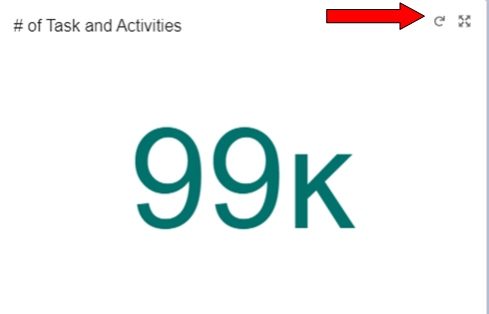
Hover over a specific widget and click the refresh icon to update just that widget. This feature will begin rolling out gradually starting in Summer ’25, so keep an eye out!
One Org-Wide Email for Report Subscription Notifications (GA)
Make your email alerts clean, consistent, and secure
Tired of inconsistent sender emails for your report subscription alerts? Salesforce now lets you designate a single, organization-wide email address to send all report subscription notifications.
This means:
- Consistent branding across emails
- Reduced risk of email spoofing
- Easier communication for recipients
How to set it up:
- Go to Setup
- Search for Reports and Dashboards Settings
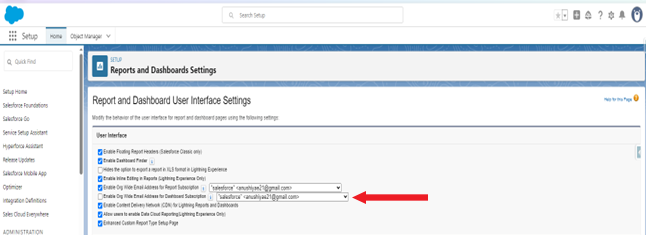
- Enable the checkbox: Enable Org-Wide Email Address for Report Subscription
- Choose the desired email address
One Org-Wide Email for Dashboard Subscription Notifications (GA)
Salesforce delivered—for dashboards too!
Just like with reports, you can now designate one email address for dashboard subscription notifications. This keeps your communication consistent and boosts trust with users.
Setup is easy:
- Head to Reports and Dashboards Settings in Setup
- Enable: Enable Org-Wide Email Address for Dashboard Subscription
- Choose the email address you want to use
Dashboard Tables That Magically Use Report Settings (Beta)
Say goodbye to double work!
This exciting Beta feature lets you reuse existing report settings when adding Lightning table widgets to dashboards. That means:
- Automatic grouping, formulas, sorting, and formatting
- No need to recreate logic manually
- Dashboard tables that match the report view exactly
To get access:
- Contact Salesforce Support to enable the beta
- When adding a Lightning table to a dashboard, select Use table settings from report (Beta)
Conclusion:
Salesforce Summer ’25 is all about saving time and enhancing consistency. Whether you’re refreshing data faster, sending emails smarter, or syncing reports and dashboards seamlessly, these features help you work smarter—not harder.
Keep exploring, and let the dashboards do the heavy lifting!