


Salesforce continues to enhance Flow capabilities to better support Admins and Developers. A standout improvement introduced between Spring ’25 and Winter ’26 is the addition of a new option in the Get Records element: “All records, up to a specified limit.” This feature provides greater control over how many records are retrieved, making flows more efficient and easier to manage.
Let’s explore what this means, how to use it, and where it’s helpful with a real example!
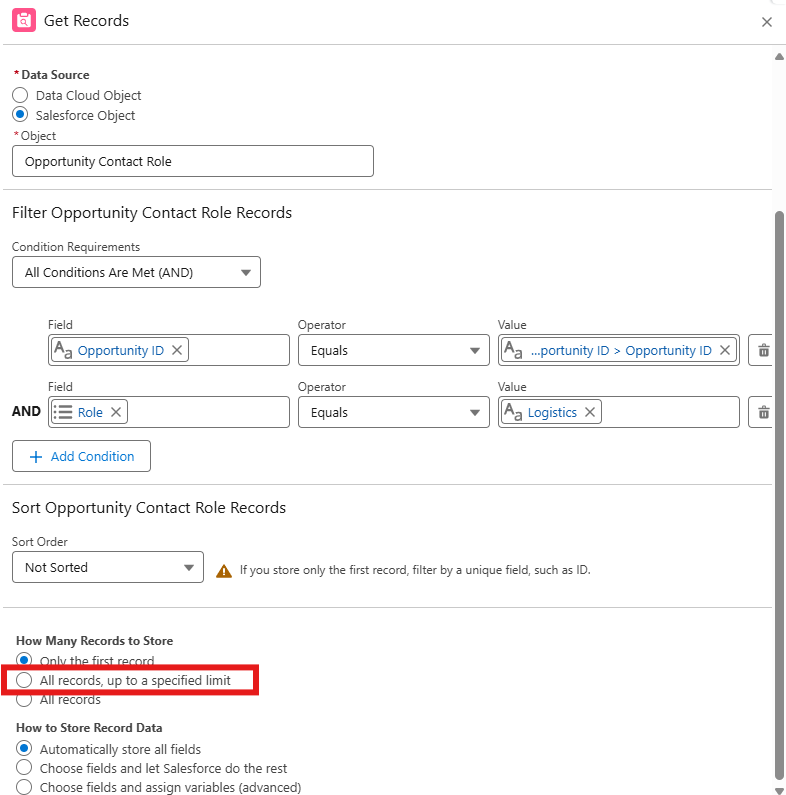
In the above screenshot, you can see a new radio button option under “How Many Records to Store”:
🔘 All records, up to a specified limit
This feature lets you limit how many records the Get Records element retrieves for something that was not natively supported before.
What Problem Does This Solve?
Before this feature: .
- You could either get only the first record, or all matching records.
- There was no in-between option.
- You had to use additional flow logic or Apex to simulate limiting rows.
- Fetching too many records increased governor limit risks and slowed performance.
Now, with this update, you can:
- Fetch just the top 3, 5, or 10 records
- Avoid looping through unnecessary data
- Improve flow performance and reliability
- Write simpler, faster, and cleaner flows
Example Use Case: Opportunity Contact Role
In this Flow, we’re retrieving Opportunity Contact Role records filtered by:
- Opportunity ID = Flow variable
- Role = “Logistics”
We’ve selected the new “All records, up to a specified limit” option.
This setup allows us to retrieve only a few logistics contacts tied to an Opportunity with no more, no less.
What’s New?
Now, Salesforce has added a third, smarter option:
Get all records, up to a specified limit (e.g., top 3, 5, or 10)
Benefits of This Feature
| Benefit | Description |
| Precision | Get only the needed records, nothing more. |
| Performance | Less data → faster flows. |
| Simplicity | Avoid unnecessary loops, filters, and Apex code. |
| Control | Works well in screen flows, autolaunched flows, and subflows. |
Best Practices
- Always combine Sort Order with record limit to control which records you fetch.
- Avoid using “All records” when you only need a few; it can cause flow failures on large datasets.
- Document why you chose a specific limit in your Flow’s description.
Final Thoughts
The “All records, up to a specified limit” setting in Flow is a simple yet powerful enhancement. In real scenarios like the Opportunity Contact Role flow, it helps us pull just the few records we need to contact with a specific role without loading unnecessary data. This not only makes our flows faster but also easier to manage, especially as automation grows during a Salesforce implementation. Whether you’re building Sales, Service, or Finance teams, this new option gives you better control and improves performance across the board.